When you’re implementing a CMMS, one thing becomes very clear: a lot of your assets look the same. Similar equipment often shares the same structure and specifications, yet teams still end up creating each asset from scratch.
That’s exactly where asset templates in Sensys CMMS make life easier. Asset templates allow you to set up common asset information once and reuse it whenever a similar asset is added. This helps you move faster during implementation and keeps your asset data consistent long after the system is live.
Three Ways to Migrate Data in Sensys
Before diving into asset templates, it’s worth noting that Sensys supports three flexible ways to migrate your data:
- Manual Entry – Create assets, locations, work orders etc. directly inside the application.
- Bulk Import, Export & Update (CSV) – Ideal for large datasets and mass updates.
- Templates – Best for repeated structures, similar assets, and recurring work.
Asset Templates: Because Not Every Asset Is Truly Unique
Assets usually come in batches, all the same type, with the same specifications and purpose, but with only a few minor differences.
Imagine a plant maintenance team registering ten air compressors in the CMMS. Most of the information is identical: the compressor type, manufacturer, model, capacity, department, etc. Only a couple of things change, like serial numbers, installation dates, or motor ratings.
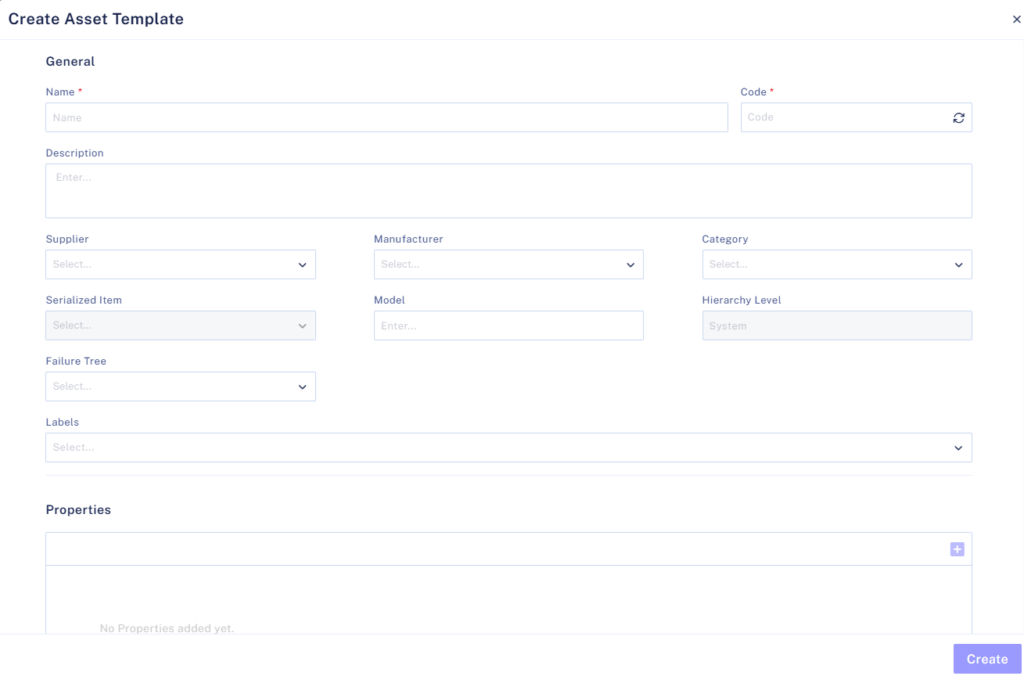
With Sensys, you can create a compressor template once, fill in all the common details, and then reuse it for every new compressor. When adding the next unit, you simply tweak the few fields that are different. What used to feel repetitive suddenly becomes quick and effortless.
Reusing Asset Hierarchies Without Rebuilding Them
Assets often belong to larger systems, and those systems tend to follow a familiar structure. Recreating that structure manually every time can be frustrating.
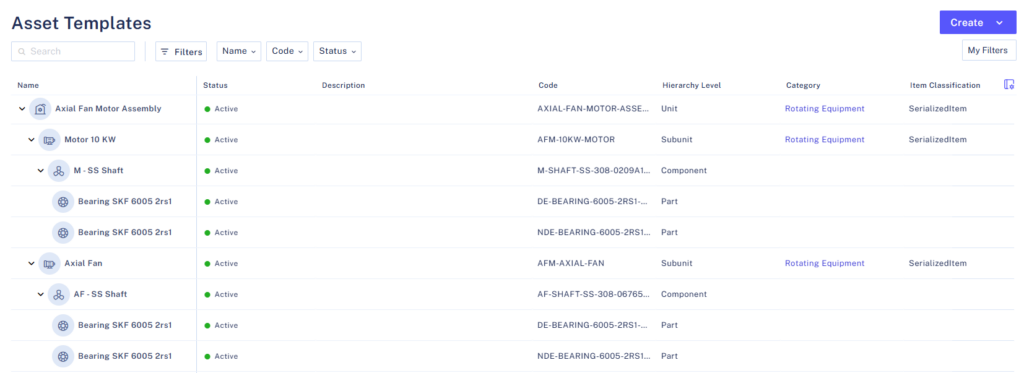
Sensys lets you build asset hierarchies inside templates, so you don’t have to start from scratch each time. For example, if an axial fan motor assembly includes the fan, electric motor, shaft and bearings, you can define that entire setup once in a template. This approach will help where we need to use the entire Axial Fan Motor Assembly.
There is another approach and that is reusing templates within templates. Assume you have a shaft template that has two children, Bearing A and Bearing B.
You can attach this Shaft Template as a child under Motor Template and by doing so, Motor will have Motor -> Shaft -> Bearing 1 and Bearing 2. You can reuse the Shaft Template while creating a Fan Hierarchy by placing it within a Fan.
The next time a similar fan assembly is added, the hierarchy is already there. You just apply the template and adjust names or identifiers as needed. It’s a simple way to keep your data organized and consistent.
Why Templates Matter During Implementation
Templates are especially valuable during the early stages of CMMS implementation. They help teams migrate data faster, avoid inconsistencies, and reduce the chance of missing important details. Even months or years later, templates continue to save time whenever new assets are added, locations are expanded, or recurring work orders are created.
A Small Feature That Makes a Big Difference
Asset templates in Sensys CMMS make asset creation simpler. They let you define standard asset details and hierarchies once, then apply them consistently across similar equipment.
Instead of rebuilding the same assets over and over again, teams can focus on accuracy and improvement.
The result is faster onboarding, cleaner asset data, and a CMMS that actually supports long-term maintenance performance.
Want to see how asset templates can simplify your CMMS setup? Book a quick demo to see them in action.