When organizations implement a CMMS, the biggest bottleneck is rarely the software itself. The real challenge is efficiently structuring and uploading operational data, including assets, locations, inventory, teams, and configurations, into the system.
This is where implementation either moves quickly… or drags for weeks.
Sensys CMMS is designed to help organizations build their digital twin, a structured digital replica of their physical world, without slowing down the process. Every asset, spare, location, and team becomes part of that digital ecosystem.
To support this, Sensys provides a dedicated Bulk Actions framework.
Bulk Actions Available in Sensys CMMS
Under the Bulk Actions category, Sensys provides three core capabilities:
- Import – Add multiple records at once
- Export – Download existing data into CSV format
- Update – Modify multiple records simultaneously
These three actions work together to help organizations implement faster, migrate smoothly, and maintain data accuracy at scale.

Where Can You Use Bulk Actions?
Bulk Actions are currently available across core master data modules that form the foundation of your CMMS setup:
- Assets
- Locations
- Inventory / Spares
- Persons
- Teams
- Companies
- Organizations
- Configurations (where applicable)

These modules define your digital structure. Having bulk functionality here ensures that system configuration and migration can happen quickly and at scale.
How Bulk Import Works in Sensys CMMS
Manual data entry works when you’re setting up a handful of records. But when implementation involves hundreds or thousands of entries, efficiency becomes critical.
Instead of manually creating each record, you can upload structured data using a CSV file. Sensys allows you to download a sample template, organize your data according to predefined attributes, and upload everything in one go.
The structure in the CSV mirrors what you see in the asset form: asset name, category, serial number, location, warranty details, assigned person, and other relevant attributes. This ensures consistency between manual entry and bulk configuration.
Before the upload is finalized, Sensys performs built-in validations on the data. If any records contain missing information, formatting issues, or invalid references, the system will list all identified errors before proceeding. At this stage, the user can either skip the faulty entries and continue with the valid ones or correct the issues in the file and re-upload it.
After validation, the system processes the file and automatically creates the records.
Once the file is uploaded, the system processes it and automatically creates all entries.
In minutes, what would have taken days is completed.
And this is not limited to assets. The same logic applies to locations, inventory items, teams, companies, and other master data modules that define your CMMS foundation.
How to Bulk Import Assets (Step-by-Step)
Let’s take the Assets module as an example.
1) Go to Assets

2) Click on the Menu (Ellipses ⋯)

3) Select Import from the dropdown
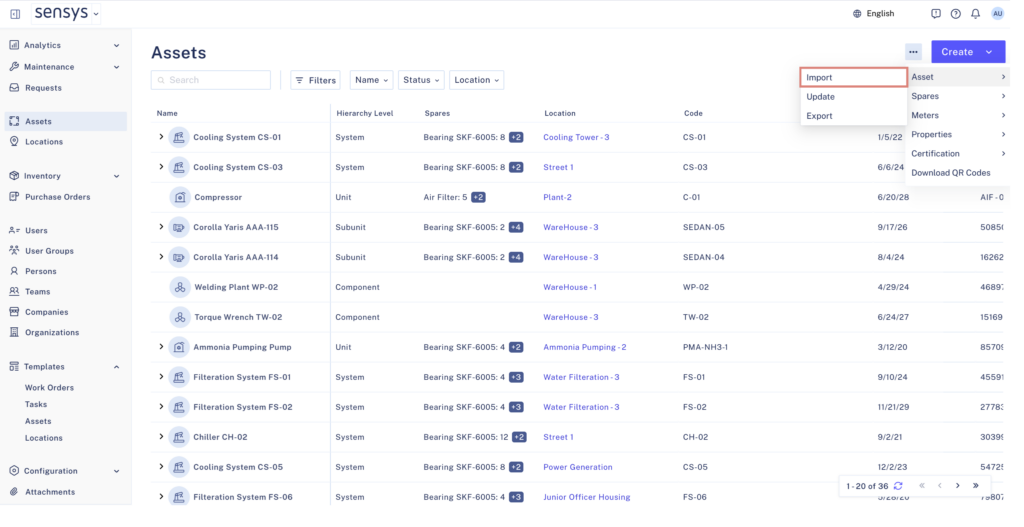
4) Download the Sample CSV File

5) Fill in your data according to the sample structure

6) Upload the completed CSV file

Bulk Import for Locations
The same logic applies to Locations.
For example, a manufacturing company may have:
- Multiple plants
- Warehouses
- Production lines
- Utility areas
- Control rooms

If this hierarchy already exists in Excel, it can be structured into the Sensys CSV template and uploaded in one go.
This is particularly useful during initial system configuration when defining the entire facility structure.
Practical Use Case of Bulk Import in CMMS
Suppose a company purchases 500 MacBooks. Each device has:
- Serial number
- Purchase date
- Warranty expiry
- Assigned employee
- Physical location
- Cost center
Procurement already maintains this information in Excel.
Instead of manually entering 500 MacBooks as assets into the CMMS, the IT team can:
- Format the sheet according to the Sensys sample CSV
- Upload the file
- Instantly create all 500 asset records
When Is Bulk Import Most Helpful?
Bulk Import is especially valuable in two scenarios:
- Initial CMMS Implementation
When setting up the system for the first time and defining all master data.
- Data Migration from ERP or Another CMMS
If you are transitioning from another platform, the process becomes:
- Export data from the existing system
- Align it with the Sensys CSV structure
- Import it into Sensys
This allows quick migration of large datasets without rebuilding everything manually.
How Bulk Update Works in Sensys CMMS
Implementation is only the beginning. Data evolves.
Suppose you need to change the location for 300 assets.
One option is to open each asset and update the field individually.
A better option is to:
- Export the data
- Modify the relevant column in Excel
- Upload it using Bulk Update
- Update all records simultaneously

Bulk Update ensures that large-scale modifications are controlled, fast, and consistent.
The Role of Export in Bulk Actions
While Import and Update often get the spotlight, Export plays an equally important role in managing your data at scale.

Export allows you to download existing records into a structured CSV file. This serves multiple practical purposes.
First, it gives you visibility. You can review your data offline, audit attributes, validate entries, or share structured records internally.
Second, Export acts as the starting point for Bulk Update. Instead of creating a new file from scratch, you can export existing data, modify specific columns, and re-upload it to apply changes across multiple records.
Third, it simplifies data migration and backup. If you need to extract master data for reporting, transition, or system review, Export ensures you can do so in a standardized format.
Our Export feature is also tightly integrated with the platform’s filtering capabilities. Instead of downloading all records from the Sensys platform, you can apply filters and export only the subset of data you actually need, whether that’s assets from a specific plant, items within a certain category, or records with a particular status.
In many real-world scenarios, Bulk Update actually begins with Export.
The cycle becomes simple:
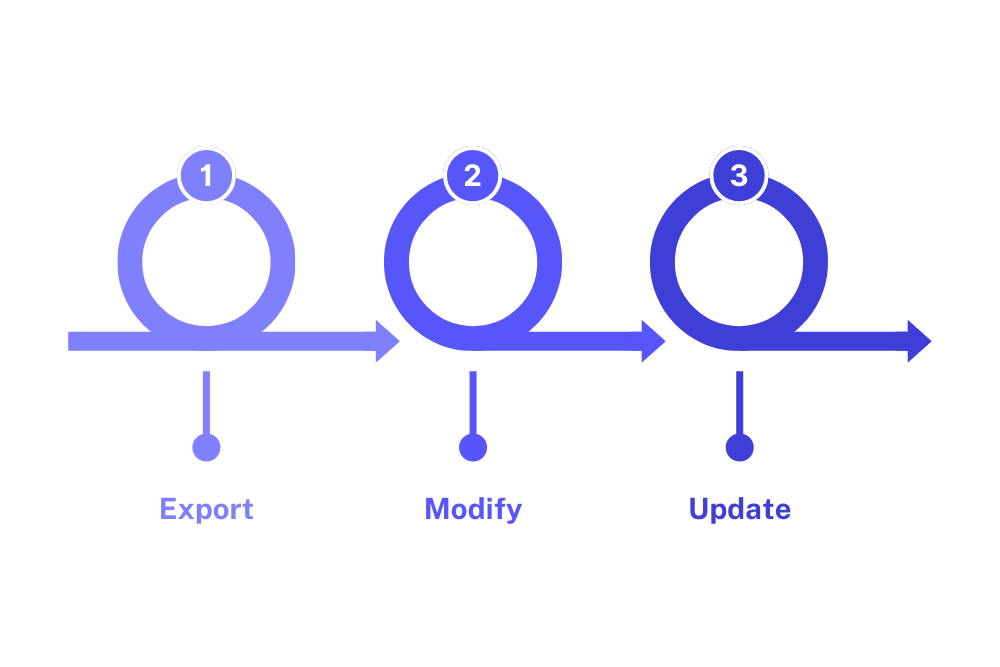
This creates a controlled and efficient way to manage large datasets without manual intervention.
At the end of the day, a CMMS should make your operations simpler, not create more administrative work. Bulk Actions in Sensys exist for exactly that reason. They remove the repetitive effort from implementation, make large-scale updates manageable, and give you control over your data without slowing your team down. Whether you’re building your digital twin from scratch or refining it as your organization grows, the ability to import, export, and update in bulk keeps your system agile and aligned with reality.
If you’re planning a CMMS implementation or looking to migrate from your current system, explore how Sensys Bulk Actions can accelerate your setup. Get in touch with us for a demo and see how quickly your digital foundation can come to life.