For many maintenance teams, the daily grind feels like an endless loop of putting out fires. There’s never enough time, and even though everyone knows that routine preventive maintenance is essential, those crucial tasks often get lost in the shuffle of urgent repairs and manual tracking. The result? Frustration builds up while digging through paper logs or trying to make sense of scribbled notes, just to figure out when a critical asset was last serviced.
What if all those important maintenance tasks, the weekly inspections, the monthly lubrication, and the usage-based checks just… happened? On time. Every time. Automatically.
That’s the power of Recurring Work Orders in modern CMMS platforms like Sensys.
What Are Recurring Work Orders?
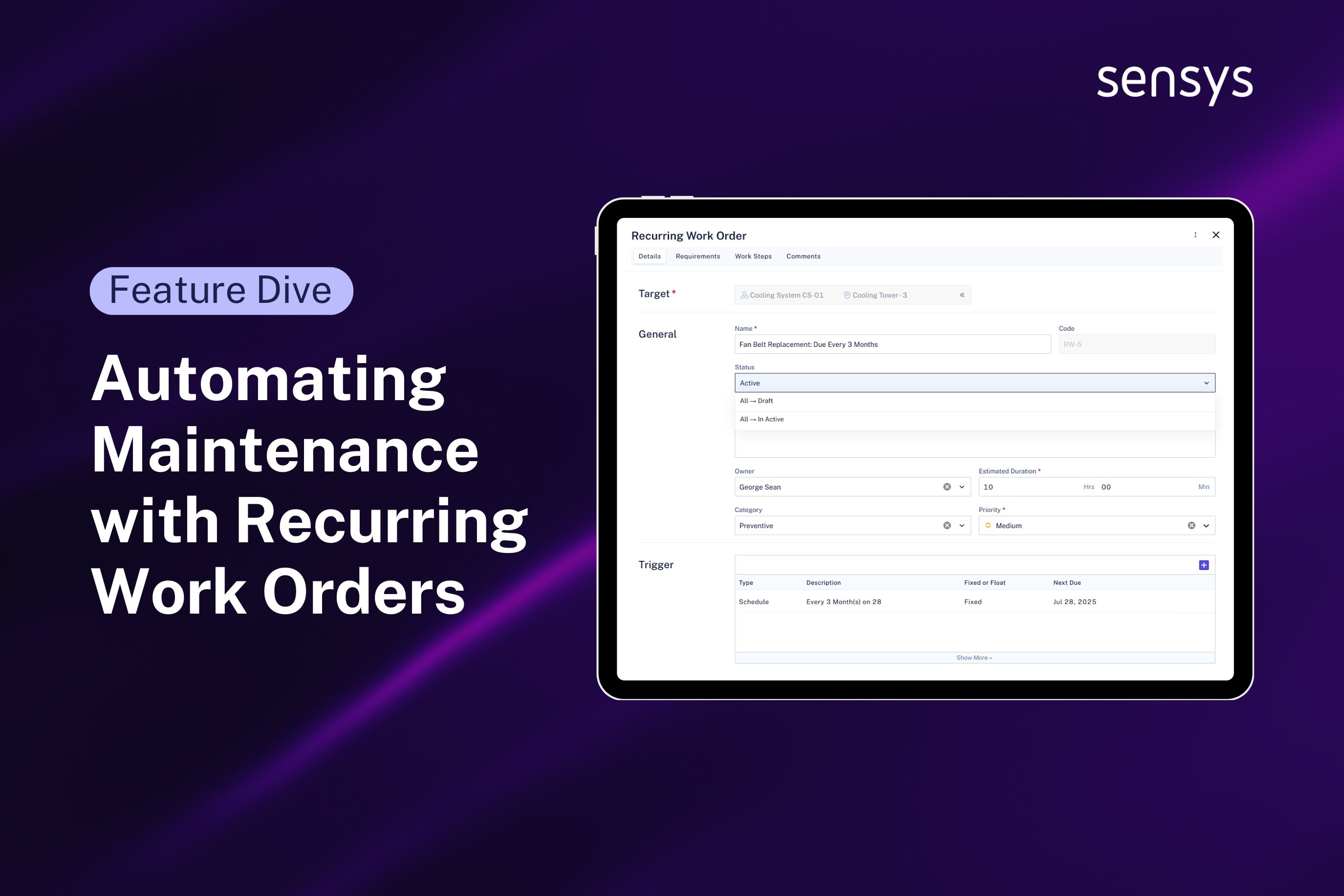
Think of a Recurring Work Order as your set-it-and-forget-it maintenance assistant. It’s a pre-scheduled work order that automatically gets created at a defined time or based on a specific condition – no need for manual creation or constant reminders.
Sensys CMMS allows you to automate critical, time-based activities such as inspections, oil changes, and sensor calibrations, guaranteeing they occur reliably by the clock. That means less admin, fewer errors, and more focus on what truly matters.
Smart Ways Sensys Triggers Recurring Work Orders
Recurring Work Orders in Sensys can be triggered in three efficient ways:
Time-Based Triggers
Perfect for tasks on a calendar schedule. Examples:
● Weekly HVAC inspections
● Monthly lubrication for rotating machines
● Annual sensor calibrations
Counter Meter-Based Triggers
Based on asset usage — ideal for mileage or cycle-based tasks. Think:
● Engine oil change after 500 operating hours
● Conveyor belt replacement after 100,000 cycles
● Forklift inspection after 1,000 miles
Gauge Meter-Based Triggers
Condition-based triggers from sensors and meters. For example:
● Replace air filters when pressure exceeds 10 psi
● Check coolant if temperature crosses 90°C
● Align machinery when vibration spikes
With these options, Sensys ensures your maintenance is always proactive – never reactive.

Fixed vs. Floating Schedules: Flexibility at Your Fingertips
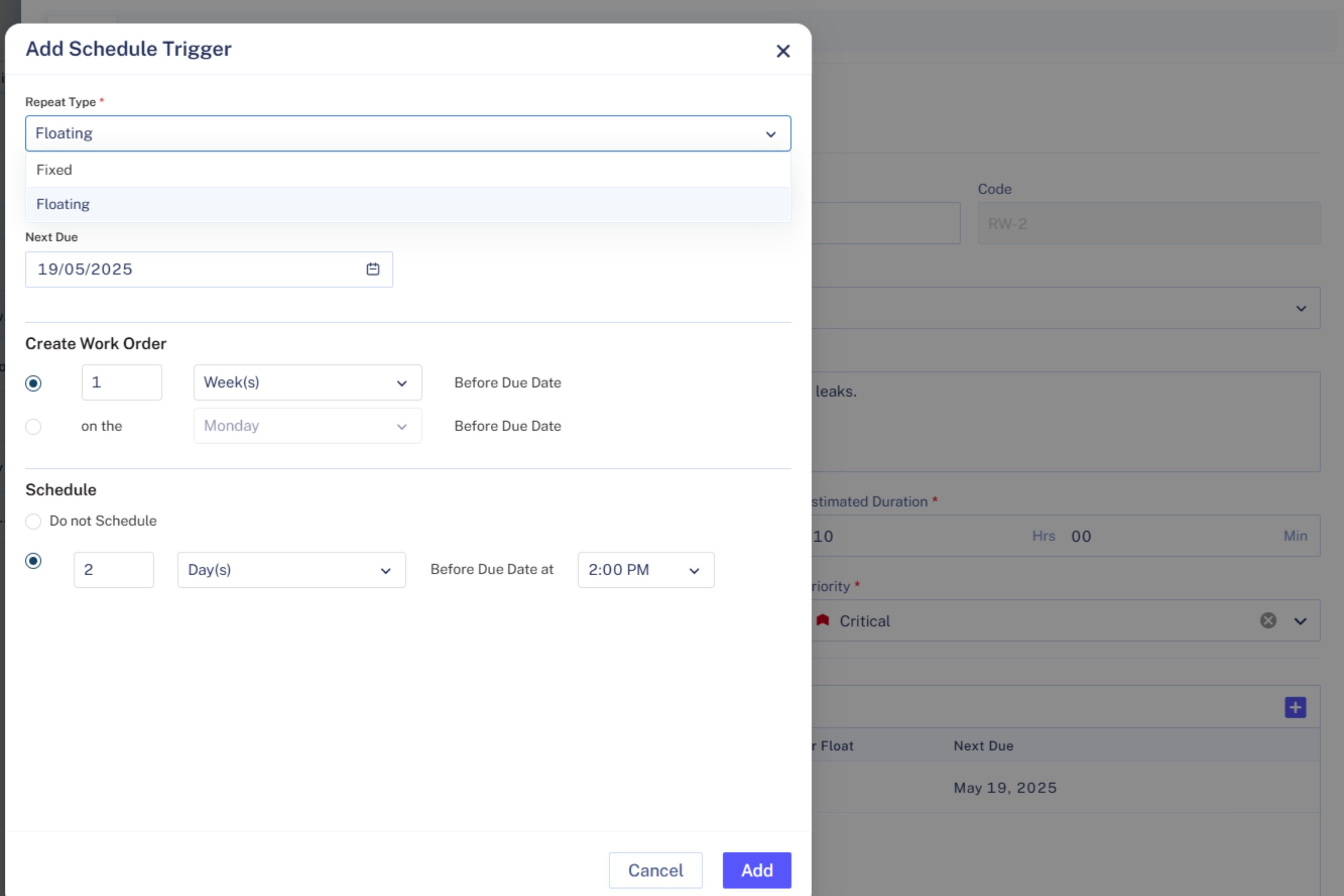
One size doesn’t fit all, and neither should your maintenance schedule. Sensys gives you two smart ways to handle recurring work orders:
Fixed Schedule
Tasks are scheduled on fixed calendar dates regardless of when the last one was completed.
Example – If a task is set for the first Monday of each month, it sticks to that date, even if the previous one was delayed.
Floating Schedule
Tasks are scheduled relative to the completion date of the previous one.
Example – If a work order is set to recur every 30 days and the last one was completed on January 5th (instead of January 1st), the next one moves to February 4th. This ensures even spacing between tasks.
Take Control of Your Work Orders: Introducing Flexible Creation, Scheduling, and Due Dates
Teams often battle the frustration of work orders hitting the system too late, inevitably leading to rushed planning and unrealistic, arbitrary deadlines. What if you could dictate exactly when a work order gets created, when your team sees it for scheduling, and even set flexible due dates based on your workflow?
Good news! We’ve added powerful new flexibility to how your work orders are generated and managed, giving you unprecedented control. Here’s a breakdown of these key features:
Get a Head Start: Work Order Creation Flexibility
Imagine a major maintenance task due at the end of the month. Waiting until the last minute for the work order to appear in your system is a recipe for stress. Our new creation flexibility lets you decide just how early that work order should pop into existence before its actual due date.
How It Works – You can configure the system to automatically create a work order a specific number of days, weeks, or even months ahead of its due date.
Why It Matters – This early creation is crucial for preparation. It gives planners ample time to line up resources, order necessary parts, coordinate logistics, and ensure technicians know what’s coming down the pipeline.
Example – If a work order is due on May 30th, you could set it to be created 7 days earlier, on May 23rd. The system handles the timing automatically based on your settings (currently applicable for Time-based and Counter-based triggers).
Plan Ahead: Work Order Scheduling Flexibility
Okay, so the work order is created early. But when do you want it to actually show up on your planner’s calendar for assignment? This is where scheduling flexibility comes in. It gives you fine-grained control over when tasks become visible and actionable for your team.
How It Works – Separate from creation, you can define how many days before the due date a task should appear on a calendar or job planner.
Why It Matters – This prevents your planners from being overwhelmed by too many tasks showing up at once, while still allowing them enough lead time to schedule the work effectively, assign technicians, and manage workloads proactively.
Example – A task due on July 10th could be scheduled to appear on the team’s planner view on July 3rd. This gives a full week for visibility, assignment, and resource allocation before the deadline even gets close.
Realistic Deadlines: Flexible Due Date Configuration
Not every work order needs a fixed calendar deadline set months in advance. Sometimes, a task is generated today, and you just need it completed within a reasonable timeframe from now. This is where the flexibility to set due dates based on creation comes in handy.
How It Works – When a work order is created (especially useful for more reactive or immediate tasks), you can specify its due date relative to the creation date – like “due in 5 days,” “due in 2 weeks,” or “due in 1 month.”
Why It Matters – This feature allows you to set more realistic deadlines that align with your current resource availability and workload. It provides flexibility for tasks that aren’t tied to strict calendar dates or meter readings but still need a clear target completion time relative to when they were identified.
Stay Clean and Organized: Extra Features You’ll Love
Skip If Open
Avoid a cluttered backlog. If a recurring work order is already open, Sensys can skip generating a new one, so your team stays focused and efficient.
Modify Next Due
Plans change, and that’s okay. You can manually adjust the next due date of any recurring work order to align with inspections, holidays, or downtimes.
Recurring Work Order Calendar
Get a bird’s eye view of all your upcoming recurring tasks in a calendar format. It’s the perfect way for planners and supervisors to stay organized and ready.
Final Thoughts: Automate, Optimize, and Relax
With Recurring Work Orders in Sensys, you’re not just automating tasks, you’re building a smarter, more reliable maintenance ecosystem. Whether it’s based on a simple schedule, asset usage, or sensor data, automating these tasks helps you move from reactive fixes to proactive care. This means less unexpected downtime, longer life for your valuable assets, and better use of your team’s time.
Ready to experience the difference automating maintenance can make for your business? Start with Sensys today!